|
Installation
Cover
Removal
To
open the TR-9200 use a coin in the slot on the bottom to
release the snap. Lift the cover up slightly to disengage
the closure and remove cover with a downward motion to clear
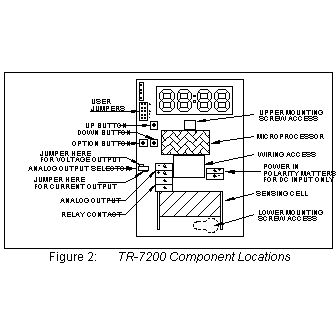
the catch at the top of the unit. The locations of controls
and terminals on the main circuit board are shown in
Figure 2.
Mounting
The
TR-9200 is designed for flush mounting with two fasteners.
The locations of the mounting points (shown
in Figure 1) allow direct mounting on a standard simplex
(single circuit) junction box. There is a wiring cutout
in the center of the unit near the terminal strips.
Figure
1

Wiring
This
section describes the external connections to the TR-9200.
Wiring enters the chassis through the cutout in the center
of the unit.
Figure
2
Power
Supply
The
TR-9200 will operate from an AC or DC input voltage between
the values called out in the
specifications. The power supply leads are connected
to the two-terminal power connector shown in
Figure 2. The TR-9200 must never be connected directly
to line power. Operation at voltages higher than specified
will damage the unit and void the warranty. When operating
from DC power, the polarity of the power leads must be as
shown in Figure 2. Reversed polarity
connection will not damage the unit, but will make it inoperable
until the connection is reversed.
Signal
Output
The
TR-9200 provides either a 0 - 10 volt or a 4 - 20 mA current
loop output at the two terminals of the analog output connector
shown in Figure 2. The type of
analog output is determined by the setting of the analog
output selector shown in Figure 2.
The analog output of the TR-9200 is completely isolated
from the power supply. The common outputs of multiple units
can be connected together with no interaction regardless
of power supply hook-up.
Voltage
When
the outboard and middle pins of the analog output selector
are connected with the shorting block, a voltage output
appears between the two terminals marked ANALOG OUTPUT.
The output voltage increases linearly from 0 volts at the
low output threshold to 10 volts at the high output threshold.
The unit is shipped from the factory with the low output
threshold at 0 ppm and the high output threshold at 2000
ppm. See the
Analog Output Range Adjustment section to change the
analog output range limits.
Current
When
the inboard and middle pins of the analog output selector
are connected with the shorting block, a current output
appears between the two terminals marked ANALOG OUTPUT.
The output current increases linearly from 4 mA at the low
output threshold to 20 mA at the high output threshold.
The unit is shipped from the factory with the low output
threshold at 0 ppm and the high output threshold at 2000
ppm. See the
Analog Output Range Adjustment section to change the
analog output range limits. If the total resistance between
the two terminals exceeds the specified maximum loop resistance,
the output current may be erroneously low at high concentrations.
Verifying
Voltage or Current Output Connection
After
the voltage or current output of the TR-9200 is connected
to a controller or indicator, the following check should
be performed to ensure that the connection has been properly
established and the TR-9200 is transmitting the correct
values:
- Be
sure that the output select jumper is set correctly for
voltage or current output. If this is not done first,
the following check may produce incorrect results. Note
whether the shorting block at jumper JP5 is covering both
pins or only a single pin, then borrow the shorting block
and slide it over the two pins of jumper JP4 (see
Figure 2). The display (if present) will show 'SEL'.
Be sure to remove the jumper from JP5, even if you have
an extra jumper for JP4.
- Momentarily
closing JP5 will set the unit to full scale output (10V
or 20mA). Do not press the buttons on the unit as this
will affect the output calibration. If the receiving device
does not indicate a full scale reading after JP5 is closed,
verify that the wiring is correct.
- Remove
the shorting block from JP4 and restore it to its original
position at jumper JP5. The TR-9200 will reset and it's
output now corresponds to the actual detected CO2 concentration.
Cover
Replacement
Engage
the top center of the cover under the latch at the top of
the base, then press the bottom of the cover onto the base
until it latches.
Field
Adjustments
This
section describes the features that can be field configured
and the procedures to make these changes.
Analog
Output Range Adjustment
This
section refers to advanced features of the TR-9200. 2000
ppm users need not perform this adjustment.
The
TR-9200 ships from the factory set for an analog output
range of 0 to 2000 ppm. This range can be changed to any
sub-range between 0 and 5000 ppm by changing two parameters:
The
low output threshold is the concentration at which
the analog output will begin to rise. The factory default
low output threshold value is 0.
The
high output threshold is the concentration at
which the analog output reaches its maximum value. The
factory default high output threshold value is 2000.
For
example, a particular application may require the analog
output to remain at 0V or 4.0 mA until the gas concentration
reaches 500 ppm, then reach 10V or 20 mA at a concentration
of 1000 ppm. In this example the analog output would scale
across this 500 ppm sub-range so that the analog output
would be at half scale (5V or 12 mA) at 750 ppm.
To
change the analog output range use the following procedure:
- Note
whether the shorting block at jumper JP5 is covering both
pins or only a single pin, then borrow the shorting block
and slide it over the two pins of jumper JP4 (see Figure
2 on page 2). The display (if present) will show 'SEL'.
Be sure to remove the jumper from JP5, even if you have
an extra jumper for JP4.
- The
display (if present) will show 'SEL'. Momentarily closing
a jumper selects which value to change. If the wrong jumper
is selected simply open JP4 to restart the unit and begin
again.
- Select
the low output threshold by momentarily closing JP1.
If the display is present it will show the current low
display threshold. If there is no display the value can
be displayed using a meter connected to the analog output.
In this calibration mode the analog output is 10,000 ppm
at full scale (i.e. 10.0 volts or 20.0 mA). If the voltage
output is selected, this scaling corresponds to 1 ppm
per millivolt or 1000 ppm per volt.
- Use
the 'UP' and 'DOWN' buttons to adjust the low output threshold
to the desired value. In the example this would be set
to 500.
- Remove
the shorting block from JP4 to save the value; the unit
will reset itself.
- Reconnect
JP4. The display (if present) will show 'SEL'. Select
the high output threshold by momentarily closing JP2.
If present, the display will show the high output threshold.
If there is no display use a volt meter as described in
step 3.
- Use
the 'UP' and 'DOWN' buttons to adjust the high output
threshold to the desired value. In the example this would
be set to 1000.
- Remove
the shorting block from JP4 and restore it to its original
position at jumper JP5. The TR-9200 will reset and its
output will now only change when the gas concentration
is within the range selected. Below this range the output
remains low, above this range the output remains high.
Altitude
Correction
The
TR-9200 is factory-calibrated for operation at sea level.
When operated at higher elevations, the calibration must
be adjusted by the amount shown in the altitude correction
table to the right.
Altitude
Correction Procedure
To
adjust the calibration of a unit currently calibrated for
sea level operation to a new altitude proceed as follows:
- Let
the TR-9200 stabilize to the ambient CO2 concentration,
and record the reading in ppm.
- Multiply
the reading by the scale factor corresponding to the operating
altitude in the altitude correction table. For instance
if the unit is operating at an altitude of 4000 ft, the
scale factor from the table is 1.14. If the concentration
reads 420 ppm, multiply 420 times 1.14 giving 478 ppm.
Adjust the display to read 480.
- Remove
the TR-9200's cover (see removal
procedure).
- Note
whether the shorting block at jumper JP5 is covering both
pins or only a single pin, then borrow the shorting block
and slide it over the two pins of jumper JP2 (see Figure
2 on page 2). Be sure to remove the jumper from JP5, even
if you have an extra jumper for JP2. 5. Use the 'UP' and
'DOWN' buttons to change the concentration to the value
just calculated.
- Remove
the shorting block from jumper JP2 and return it to its
previous position over one or both pins of jumper JP5.
- Replace
the cover (see procedure).
|


 The
AirTest TR-9200 is a non-dispersive infrared analyzer for
measuring environmental CO2 (
The
AirTest TR-9200 is a non-dispersive infrared analyzer for
measuring environmental CO2 (


